

Alamoda Feature Tour
Build Your AI Wardrobe: The 5-Minute Alamoda Feature Tour
Spend less time wondering what to wear and more time enjoying your wardrobe.
Alamoda brings your clothes, outfits, plans, and personal style into one AI-powered digital wardrobe. You can organize the pieces you own, create new combinations, ask Moda AI for ideas, prepare looks for trips and events, and learn which parts of your wardrobe are working hardest for you.
You will not photograph an entire closet in five minutes—and you do not need to. This quick tour shows how the app fits together and how a few small steps can create a useful foundation you can build at your own pace.
Small taps. Clearer choices. A wardrobe that feels easier to use.

Your Digital Wardrobe: Organized and Ready
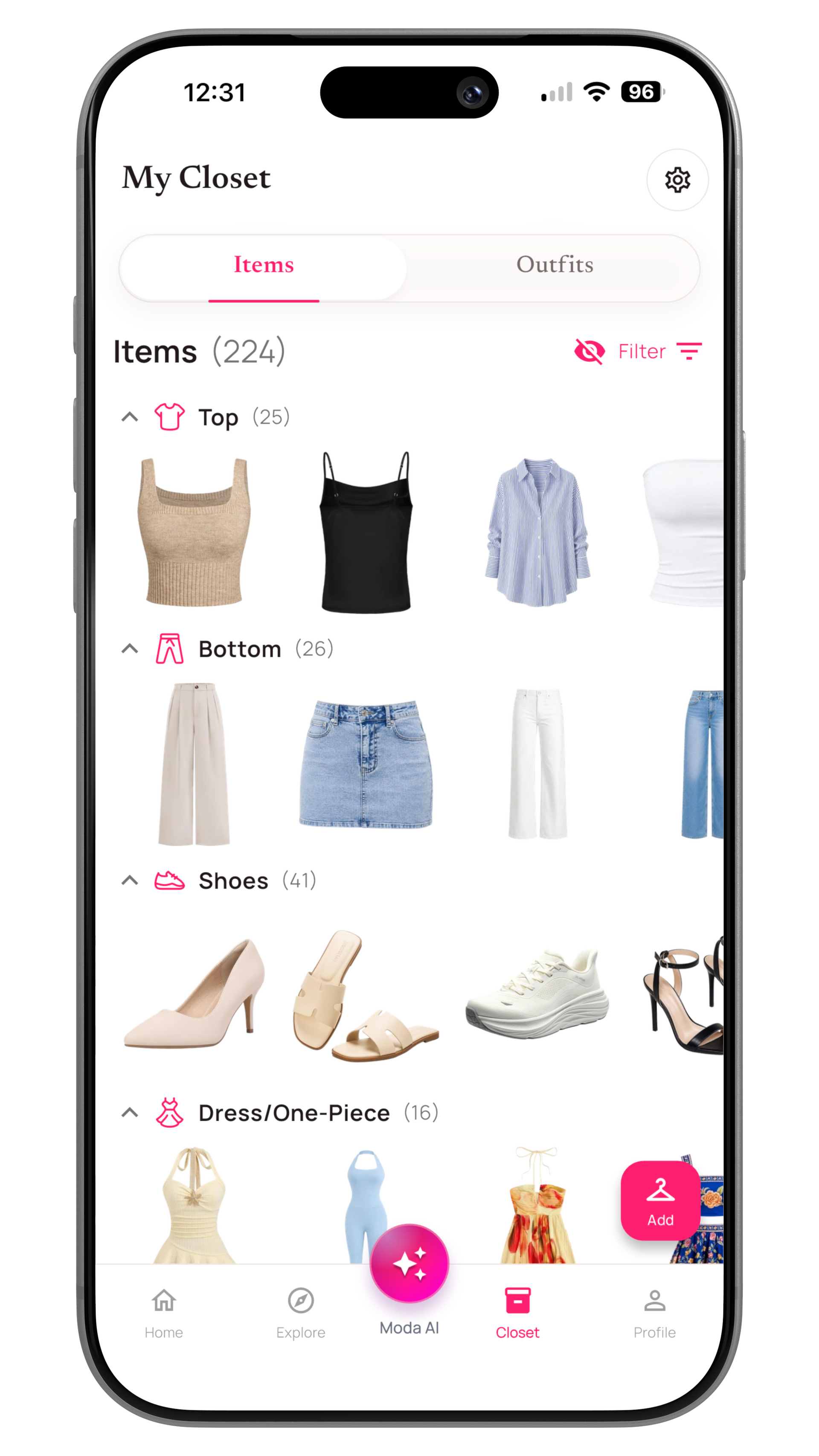
Everything starts in your Alamoda closet. Add an item with your camera, choose an existing photo, or use bulk upload when you want to process several pieces together.
Alamoda can remove distracting backgrounds so each garment appears as a clean, product-style image. If an edge needs attention, you can refine the result manually.
Once the image is ready, Moda AI can identify details such as the item category, colors, seasons, and other styling information. Review the suggestions, make any changes, and add useful details such as brand, material, price, purchase date, notes, or a product link.
Your organization system does not have to look like anyone else’s. Use Alamoda’s built-in categories or create custom ones that match the way you dress.
- Search, filter, and sort your wardrobe
- Mark favorite pieces
- Track whether an item is clean or in laundry
- Choose whether Moda AI should consider laundry items when creating outfit ideas
- Keep item information available across your devices through synchronization
Outfit Creation: From Separate Pieces to a Complete Look
A useful wardrobe is more than a collection of item photos. Alamoda helps you turn those pieces into outfits you can actually wear.
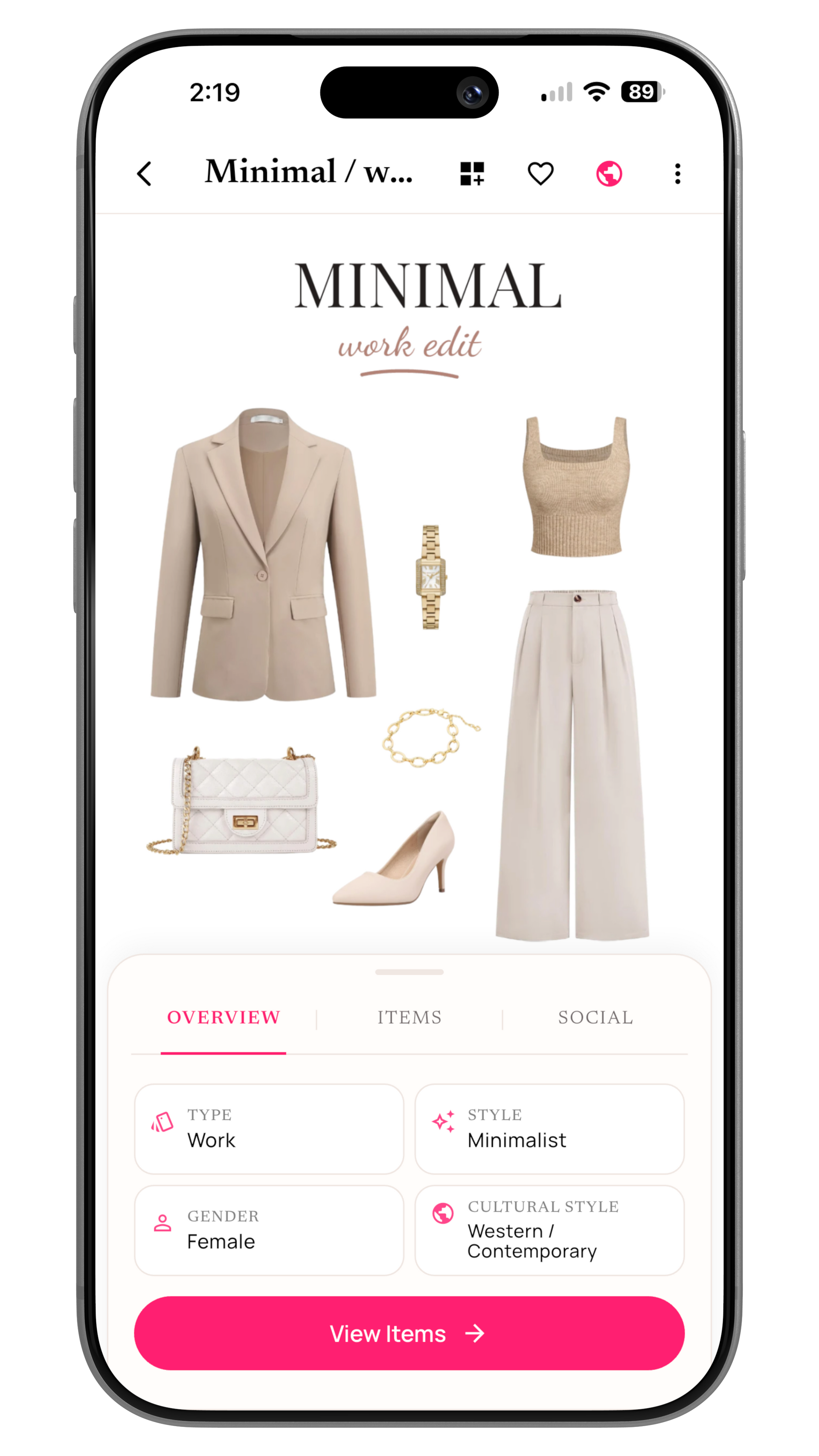
Start manually by selecting the core parts of a look, adding shoes and accessories, and arranging everything on a visual canvas. Move, resize, rotate, and layer each item until the composition feels right. You can use alignment guides, change the background, and add styled text or decorative elements when you want a more polished mood-board presentation.
Save the finished outfit with details such as its name, style, type, notes, and visibility. Keep it private for personal planning or choose to make it public when you want it to appear in Explore.
Saved outfits can then become part of the rest of your routine. Use them when planning your calendar, coordinating an event, or preparing a trip.
Moda AI Outfit Ideas: Inspiration From Your Own Closet
Sometimes you want to style an outfit yourself. Other times, you want a fresh starting point. Moda AI can create outfit suggestions using eligible pieces from your Alamoda wardrobe.
Tell Moda AI what you are dressing for, choose a preferred style and weather, and optionally select one item you want the outfit to include. Alamoda narrows the relevant closet pieces and asks Moda AI to propose a coordinated combination.
When you like a suggestion, open it in the outfit builder and make it yours. Swap an item, adjust the canvas, add accessories, or save the combination as shown. The suggestion begins with your own wardrobe, but you remain in control of the final look.
Moda AI Outfit Check: Get a Second Opinion Before You Step Out
Have a complete outfit but want another perspective? OutfitCheck lets Moda AI analyze a photo of the look and return structured styling feedback.
You can submit:
- One person wearing a complete outfit
- A complete outfit arranged together without a person
- A coordinated couple’s look
- A group look for friends
For useful feedback, the photo should show the complete outfit rather than one isolated garment. Add context such as the occasion and, when relevant, weather information. Moda AI then evaluates areas such as overall coordination, color harmony, fit or layout, event suitability, and weather appropriateness when weather context is provided.
The result includes a compatibility score, a category breakdown, feedback, and styling ideas.

Improve Outfit: Turn Feedback Into a Visual Styling Idea
After a valid Outfit Check, you can take the next step with Improve Outfit. Review Moda AI’s recommendations, choose the changes you want to explore, and add your own specific styling request when you have another idea in mind.
Improve Outfit uses the original photo and your selected directions to create an updated visualization. Explore how a different color, accessory, shoe, layer, or garment adjustment could affect the full outfit before deciding what you want to change in real life.
The generated result is a creative styling visualization, not a guarantee of exact fit, fabric behavior, or appearance.

Your Style Profile: Recommendations Shaped Around You
Personal style is not one-size-fits-all. Alamoda’s Style Profile gives Moda AI more context about the person behind the wardrobe.
Build your profile around details that matter to you, including:
- Style preferences and fashion goals
- Favorite and disliked colors
- Body and fit preferences
- Clothing and shoe sizes
- Brand-specific size variations
- Preferred materials and patterns
- Cultural-wear preferences
- Comfort, trend, and sustainability priorities
You can select a seasonal color palette, create your own palette, or analyze a selfie to generate a color-harmony palette and seasonal result. The profile can then help Alamoda make suggestions that better reflect your preferences instead of relying on generic fashion rules.
Travel Planning: Organize the Trip and the Outfits
Packing becomes easier when you plan complete looks instead of collecting unrelated clothes in a suitcase.
Create a trip with its destination and dates, add a cover, and build a packing list from wardrobe pieces and custom essentials. Track quantities and packed status so you can see what is ready and what is still missing.
Trips can also include individual events with their own date, time, location, dress code, and notes. Assign outfits to those events so the clothes you pack connect to the plans on your itinerary.
Travel does not have to be planned alone. Invite family, friends, or loved ones to a shared trip, coordinate event outfits, and view relevant wardrobe contributions from trip members.

Outfit Calendar: Plan Ahead and Remember What Worked
The Outfit Calendar connects your wardrobe to real life. Plan a future outfit for a date or event, or log a look you have already worn. Add the occasion, notes, times, and selected outfit or wardrobe items so the entry has useful context later.
Over time, those entries create a wearing history. They also power parts of Moda Insights, including wardrobe utilization, most-worn items, colors and seasons you actually wear, and pieces you may want to rediscover.
Use the calendar to prepare a workweek, reserve an outfit for an event, remember a successful combination, or simply make tomorrow morning easier.

Virtual Try-On: Explore a Possibility Before Wearing It
Virtual Try-On gives you another way to experiment. Choose a suitable photo and a wardrobe item to generate a visual preview of how that piece could look when worn.
The result is a creative visualization rather than a guarantee of exact physical fit, sizing, or fabric behavior. Use it to explore an idea, compare styling directions, or decide which combination you want to try in real life.
Explore: Style With the Moda Community
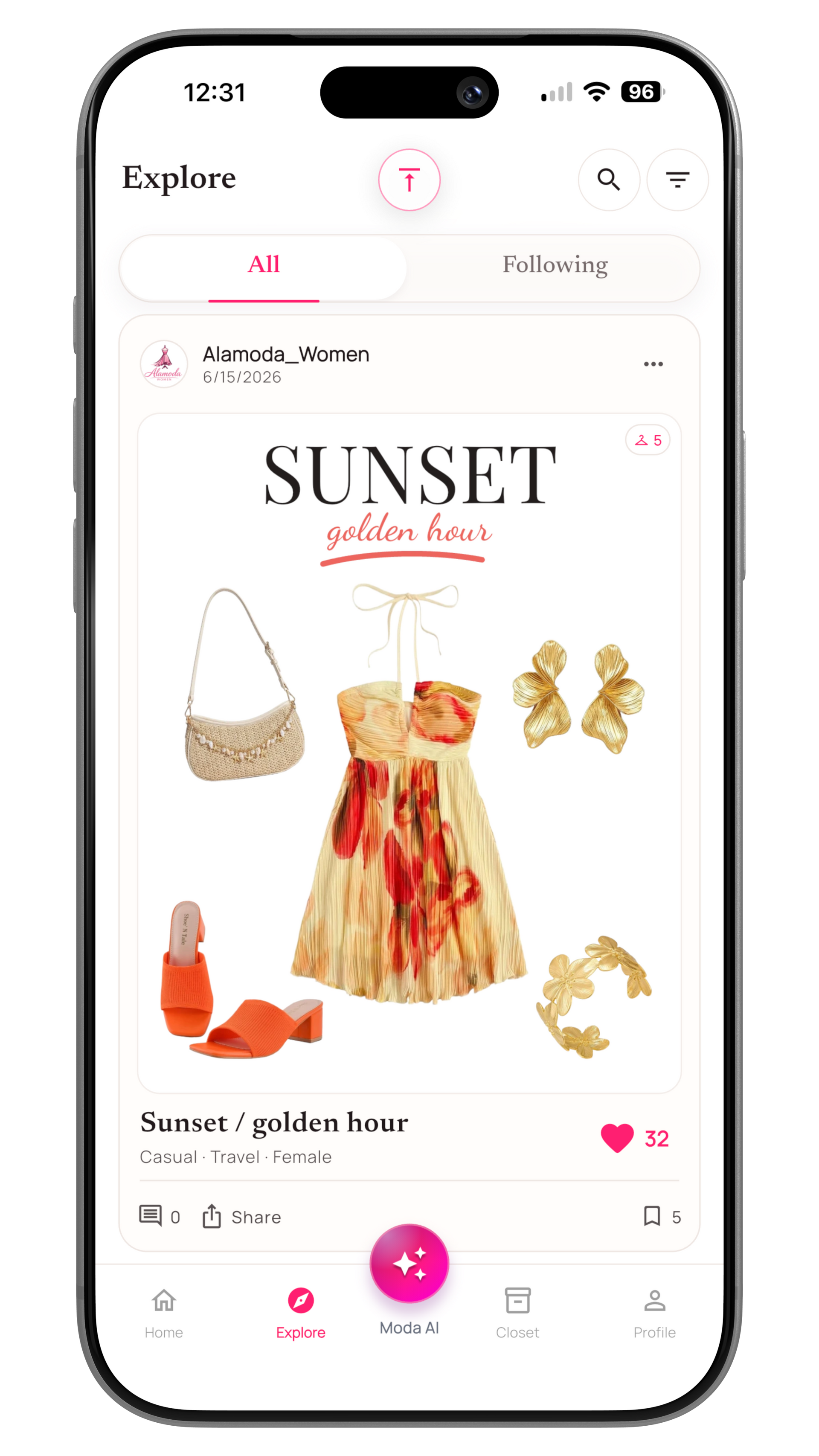
Your personal wardrobe remains yours. Outfits are private by default and appear in Explore only when you choose to make them public and their media is ready.
Explore lets you discover public outfits, search and filter inspiration, follow creators, save outfits, and interact through likes and comments. You decide which of your finished looks you want to share.
This creates a useful balance: private tools for organizing your own style, plus an optional community when you want ideas or feedback from other people.
Moda Insights: Understand How Your Wardrobe Performs
Moda Insights turns wardrobe and calendar activity into information you can use. Instead of relying on a vague impression of your closet, you can see patterns across what you own, what you wear, and what you spend.
Depending on the information you add and the outfits you log, insights can include:
- Wardrobe distribution by category, color, season, and material
- Total wardrobe value and value by category
- Wardrobe utilization
- Most-worn and unworn items
- Colors and seasons represented in your wearing history
- Cost-per-wear for items with price and wear data
- Best-value pieces and high-value unworn items
- Recent purchases, sale savings, and wardrobe age
Insights become more useful as you maintain your wardrobe and log real outfits. They are not there to judge your style. They help you notice what deserves more wear and make future decisions with clearer information.
Start Small
Your First Five Minutes With Alamoda
You do not need a perfect catalog before Alamoda becomes useful. Start with one small win:
- Add a few favorite pieces. Photograph three to five items against a simple background.
- Let Alamoda clean and organize them. Remove the backgrounds, review the AI-generated details, and correct anything that needs attention.
- Create your first outfit. Combine those pieces manually, or continue adding core items until Moda AI has enough wardrobe variety to suggest complete looks.
- Save the look. Add it to your closet and plan when you want to wear it.
- Personalize over time. Complete your Style Profile, add more clothing, try Outfit Check and Improve Outfit with a complete look, and begin logging outfits on your calendar.
That is the real quick start: not finishing everything at once, but creating a foundation that immediately makes the next outfit easier.
Before and After Alamoda
Before
Clothes are easy to forget. Outfit ideas live in your head. Packing begins with a pile. Purchases depend on memory. Getting dressed can feel like starting over every day.
With Alamoda
Your wardrobe is visible and searchable. Favorite combinations are saved. Trips and events have planned outfits. Moda AI can suggest ideas using your clothes. Your calendar and insights show what you actually wear.
Alamoda does not replace personal taste. It gives your taste a better system.
Available on iPhone and Android
Ready to Make Your Wardrobe Easier to Use?
Start free, add a few pieces, and create your first outfit today. You can build the rest of your digital wardrobe at your own pace.
Download Alamoda