

Explore + Moda Try-On
Discover a Look in Explore—Then Try It with Moda Try-On
Outfit inspiration becomes more useful when you can move beyond looking at it and begin picturing the complete style on yourself.
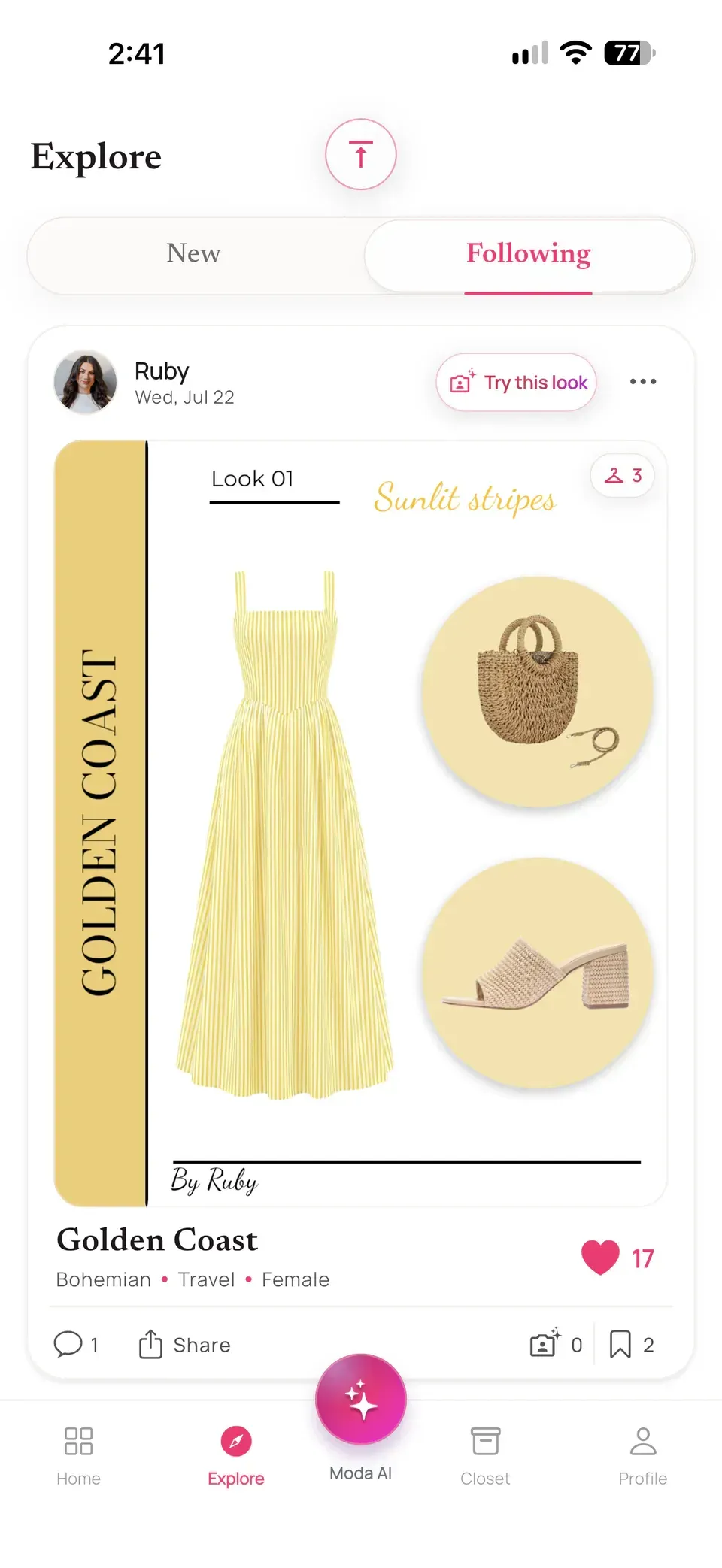
Alamoda now connects eligible public outfits in Explore directly to Moda Try-On. When a community look catches your attention, tap Try this look, add a clear photo of yourself, and create a personal AI visualization without rebuilding the outfit one item at a time.
Unlike a standalone virtual try-on app that begins with one product image, this connected experience starts with a coordinated community outfit and keeps the result inside your Alamoda styling workflow.
Outfit inspiration
Explore Complete Looks, Not Just Isolated Products
Alamoda Explore is a place to discover public outfits created by other members of the community. Each outfit can express a complete idea: the clothes, accessories, colors, proportions, and visual mood working together as one look.
You can browse different styles, save ideas, follow creators, and open an outfit to see more detail. When a creator has attached a product or source link to an item, you can also open that link from the outfit details.
This makes Explore useful for more than passive scrolling. It can help you notice combinations you would not have built on your own, consider a new color story, or find a direction for an event, trip, or everyday look.
One connected action
What “Try This Look” Actually Does
On an available public Explore outfit, tapping Try this look opens Moda Try-On with that outfit already selected. Alamoda uses the creator’s published outfit canvas as the visual reference—not the creator’s private wardrobe information.
That distinction matters. You do not need to search for every item or reconstruct the outfit yourself. The coordinated look moves into the Try-On flow as one creative direction, ready to pair with your photo.
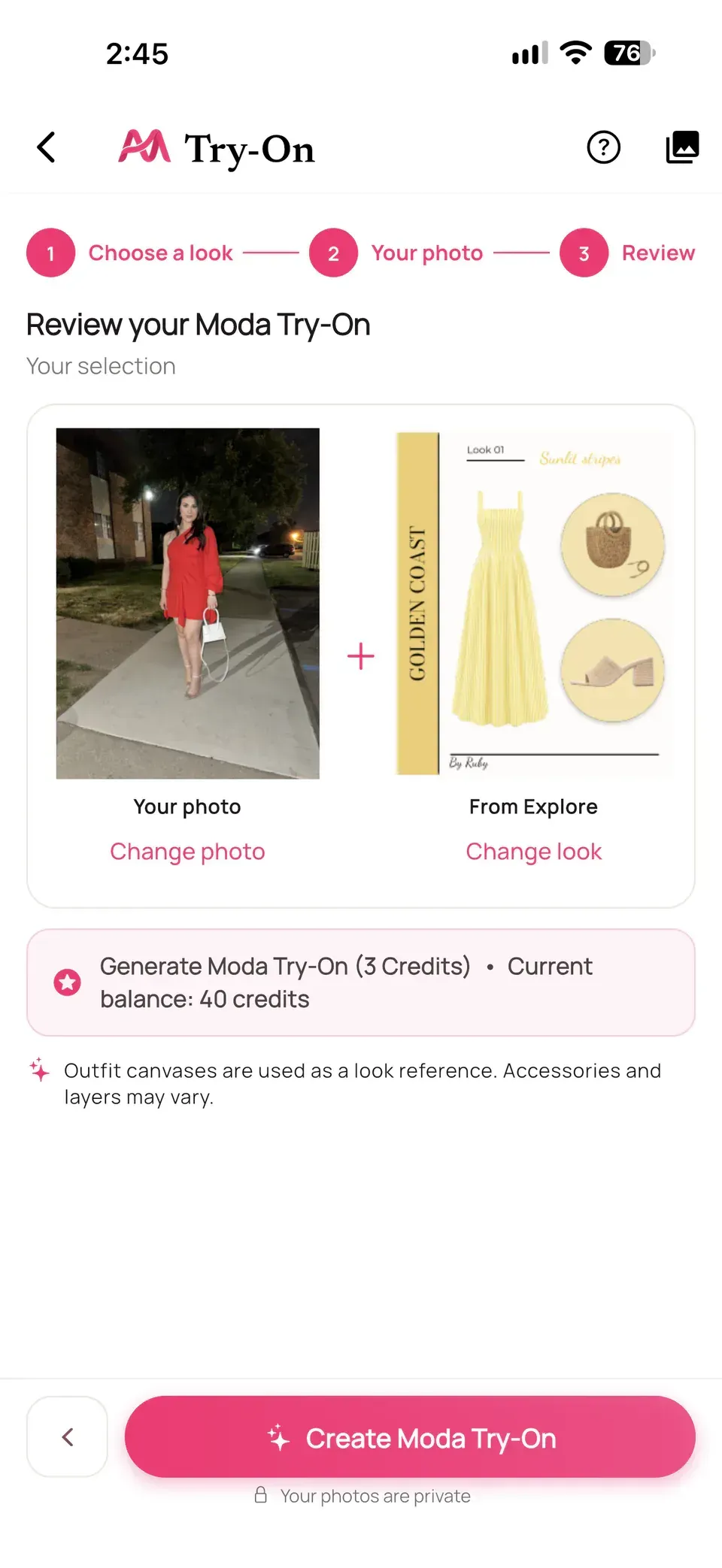
You can review the selected look before creating anything. If you change your mind, Moda Try-On also lets you replace it with a wardrobe item, an uploaded clothing photo, or one of your saved outfits.
The complete flow
How to Try an Explore Outfit with Moda Try-On
- Browse Explore. Find an available public outfit that fits the mood, occasion, or style you want to explore.
- Tap “Try this look.” Alamoda opens Moda Try-On with the published outfit canvas already selected.
- Add your photo. Choose a clear, full-body image that gives the model useful visual context.
- Review the pairing. Confirm both your photo and the preselected Explore look before continuing.
- Check the cost and create. The review screen shows the current credit cost and your available balance. At the time of writing, a Moda Try-On uses 3 Moda AI credits.
- Keep browsing. Generation continues as a background task, so you do not have to stay on the screen while Alamoda works.
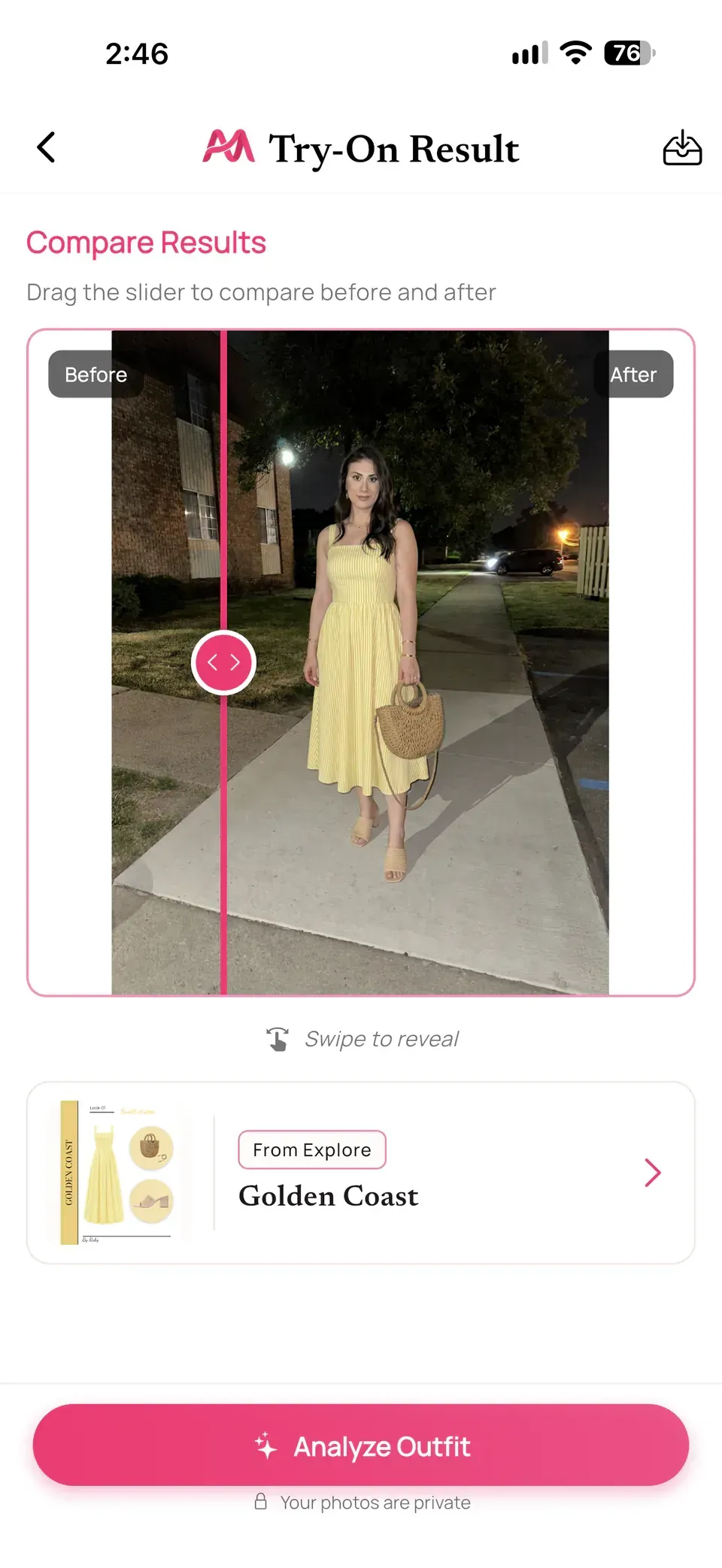
- Open the finished preview. Compare before and after, save the result, or continue into Outfit Check for styling feedback.
From community inspiration to a personal visualization—without interrupting the rest of your Alamoda experience.
Before you create
Choose a Photo That Gives Moda Try-On Useful Context
The photo does not have to be a professional portrait, but clarity helps. For a more useful visualization, choose an image with:
Your Full Body Visible
Keep the body in frame without major cropping or obstruction.
Clear, Even Lighting
Use a bright image where your outline and current clothing are easy to see.
A Straightforward Pose
A natural front-facing or lightly angled pose gives the preview a cleaner starting point.
Minimal Visual Clutter
Avoid large bags, furniture, other people, or objects covering the body.
Fitted or relatively simple base clothing can also give the model more useful context than a photo where the body is hidden beneath bulky layers. These choices can improve the starting information, but they do not guarantee a perfect generation.
Made for real use
Keep Exploring While Moda Try-On Works
AI generation takes time and requires an internet connection, but it does not have to stop your browsing session. After the task is submitted, Alamoda lets you return to the app while Moda Try-On continues in the background.
A status message tells you when the Try-On is still working, ready to review, or needs attention. You can browse more outfits, return to your wardrobe, or continue planning while you wait.
Only one Moda Try-On task runs at a time, helping the app keep the active result and credit state clear.
Your visualization
Compare the Result, Save It, or Ask Moda AI to Analyze It
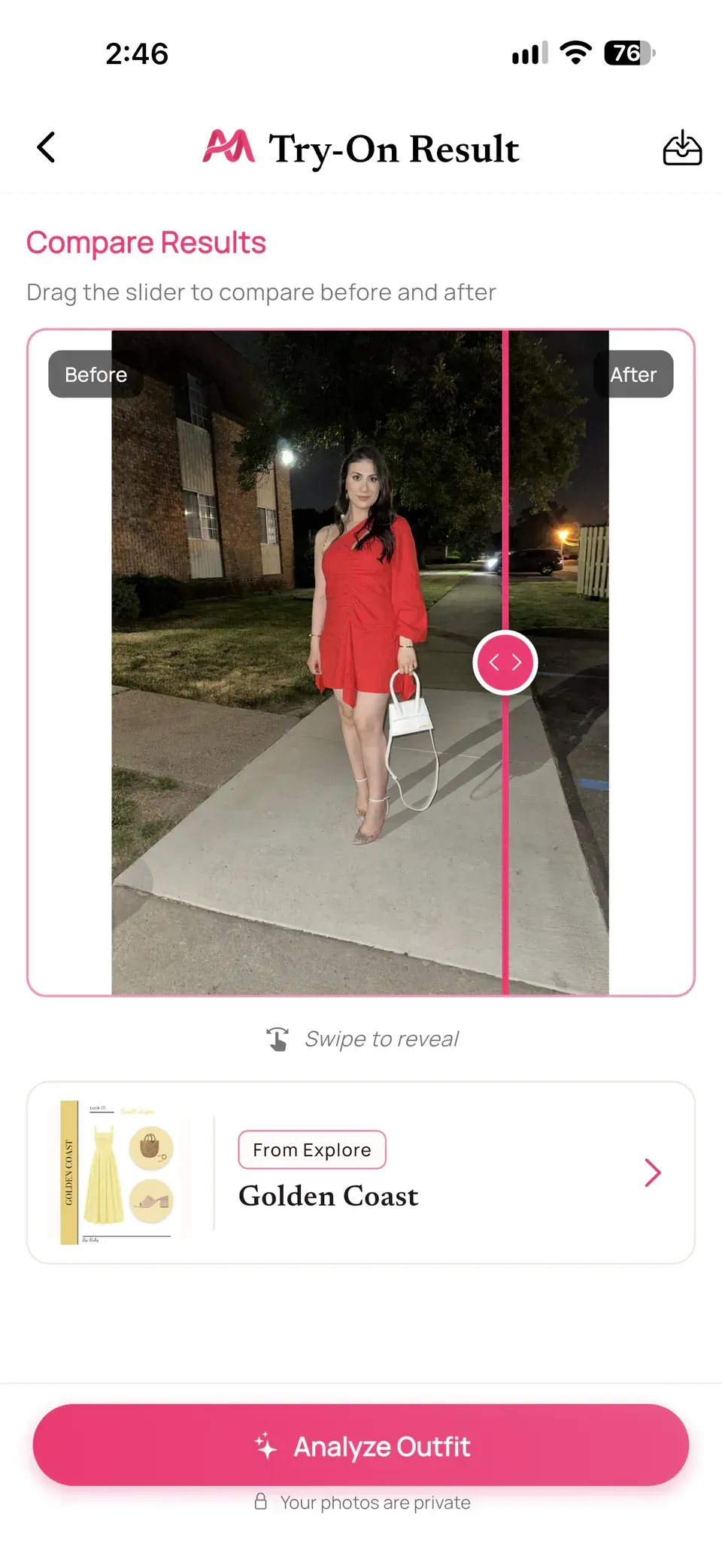
When the result is ready, use the interactive comparison to move between your original photo and the generated preview. It is a simple way to judge the overall color story, silhouette direction, and styling mood side by side.
If the idea is useful, download the generated image to your device. Alamoda also keeps Try-On results in your private history during their retention period, where you can view or delete them.
Want a second opinion? Send the generated look into Outfit Check and ask Moda AI to analyze the coordination and offer styling feedback. Discovery, visualization, and analysis stay connected in one app.
One connected wardrobe app
Why This Is More Than Another Fashion Feed
Traditional inspiration often ends with a saved post. Alamoda gives that inspiration a next step by connecting several parts of the app:
Create
Build a complete look with Alamoda’s visual Outfit Creator.
Share
Publish an eligible outfit so it can become discoverable in Explore.
Discover
Browse complete outfit ideas from the Alamoda community.
Visualize
Use Try this look to carry that style direction into Moda Try-On.
Refine
Save the result or send it to Outfit Check for another perspective.
Inspiration no longer has to stop at “I like that.” It can become a style direction you actively explore.
A creative preview
What Moda Try-On Can—and Cannot—Show
Use It For
- Visualizing the overall direction of a complete look
- Exploring new colors, silhouettes, and styling moods
- Comparing outfit ideas before recreating them yourself
- Creating a reference for pieces you own or may want to find
Keep in Mind
- It is an AI-generated visualization, not a fitting room
- It does not provide exact sizing or a physical fit guarantee
- Fabric behavior, construction, accessories, and layers may vary
- The result should be treated as inspiration before trying clothing in real life
Common questions
Questions About Try This Look and Moda Try-On
Can I use Try this look on every Explore outfit?
It appears on available public outfits whose finished canvas is ready for Explore. If an outfit is no longer public or ready, Alamoda will not open it in Moda Try-On.
Do I need an Alamoda account?
Yes. You must be signed in to start a Moda Try-On from an Explore outfit.
Does Try this look use the creator’s private wardrobe data?
No. Moda Try-On uses the public outfit’s published canvas as the look reference. Another creator’s private wardrobe identifiers are not passed into your Try-On job.
Will every layer and accessory appear exactly the same?
Not necessarily. The canvas guides the coordinated style, but layers, accessories, textures, and details can vary in the AI-generated result.
Does Moda Try-On show exact size or fit?
No. It creates a creative styling visualization, not body measurements, garment sizing, or a guarantee of how clothing will fit in real life.
How many credits does a Moda Try-On use?
At the time of writing, one generation uses 3 Moda AI credits. The review screen shows the cost and your balance before you create it. If generation fails, the reserved credits are restored.
Can I keep browsing while the result is created?
Yes. The generation continues as a background task, and Alamoda lets you know when the result is ready or needs attention.
How are my photos handled?
Alamoda requests consent before AI photo processing. Selected photos and styling details are uploaded for processing by supported AI providers, are not used to train third-party AI models, and the Try-On remains private to your account. Try-On results are deleted after 30 days; copies you download remain on your device.
Discover. Try. Make it yours.
Turn Outfit Inspiration Into a Look You Can Explore Personally
Browse community outfits, tap Try this look, and use Moda Try-On to see where a new style direction could take you.
Download Alamoda on iPhone or Android